
Recent Questions

درباره سایت
آخرین مطالب
- Fiverizer: convert a website from XHTML 1.0 to HTML5
- How to Convert Your Website from XHTML 1.0 to HTML5 the Quick and Easy Way
- DC Blog RSS Feed
- [Updated] Free Mobile-Friendly Layout Wizard
- [Fixed] Feedback Form Wizard
- GitHub patch release previous version
- 15 years of blogging 500 posts later
- How to disable Laravel console commands
- Vue show and hide form elements
- Extracting a time into select menus with PHP
امکانات وب

I'm creating an input form for use with a 'tablet' PC in Excel for our guys to fill out when in the field. As inputs like drop-down menus and the like are quite fiddly, I wish to use a basic input Form with big Pass/Fail Command buttons. Rather than using individual CommandBoxes to call the form, I've elected to use the following code (within the object/sheet) to call up the Form when certain cells are selected:
Private Sub Worksheet_SelectionChange(ByVal Target As Range)
    If Selection.Count = 2 Then
        If Not Intersect(Target, Me.Range("W16:W46,W74:W143")) Is Nothing Then
            PFInputForm.Show
        End If
    End If
End Sub
The input form (Input Form Layout) calls on information relative to the ActiveCell, to populate the Item#, Description & Comments using the following code in the FORM.
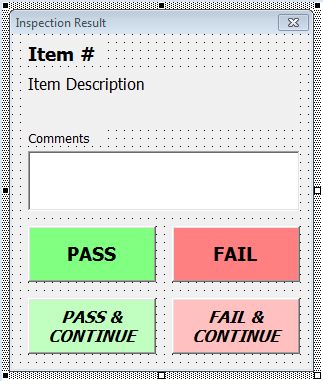
Private Sub UserForm_Initialize()
    PFInputForm.INPUTCOMMENT.Text = CStr(ActiveCell.Offset(0, 1).Value)
    PFInputForm.ITEMNO = "Item " & ActiveCell.Offset(0, -2)
    PFInputForm.ITEMDESCR = ActiveCell.Offset(0, -1)
End Sub
The intention is for the user to enter a comment (if applicable), then click one of the four buttons "Pass", "Fail", "Pass & Continue" and "Fail & Continue".
If they click "Pass" or "Fail", I have code in the Form retu the text in the Comment box to the adjacent cell (using Offset), enter "P" or "F" respectively in the Active Cell, and close the user form with no problems (using the following code in the FORM).
Private Sub PASSButton_Click()
    PFInputForm.Hide
    ActiveCell = "P"
    ActiveCell.Offset(0, 1) = PFInputForm.INPUTCOMMENT
End Sub
The problem I have is when I want the user to click either "Pass & Continue" or "Fail & Continue", where the above is meant to happen, but the Active Cell then moves down one cell, and opens up a new Form specific for that row.
The code I currently run from the FORM for the "Pass & Continue" is below. The problem I have is that when the new Form opens, I can see the new active cell is selected on the Sheet, but the form is still calling on the information from the previous ActiveCell.
Private Sub PCONTButton_Click()
    PFInputForm.Hide
    ActiveCell = "P"
    ActiveCell.Offset(0, 1) = PFInputForm.INPUTCOMMENT
    ActiveCell.Offset(1, 0).Select
End Sub
I've unsuccessfully tried a few variants, including hiding the user form (both in the FORM code and the Sheet code), but after a few hours of trawling this (and other) forums, I feel I'm now just stabbing in the dark!
Many Thanks for Any Help!
Stich
برچسب:
نویسنده: استخدام کار